Vision and Architecture
This document contains a summary of Rhapsody's history, a walkthrough of the long-term vision for Rhapsody, and things you need to know to be productive in Rhapsody today.
What is Rhapsody?
Rhapsody is the primary frontend application for the Salesloft platform and encompasses the Cadence, Analytics, and Conversations products as well as aspects of the Dialer product.
History and Context
In 2015, Rhapsody started as an Angular SPA embedded in Melody. Melody acts primarily as an API backend now, but originally it was the only service Salesloft had, acting as a full-stack monolithic application. The Angular application kept growing, but Google announced that Angular 2 was going to be a complete departure from Angular 1 and there would be no upgrade path. We started to assess other frameworks and settled on React.
Around the end of 2017, the first React components were added to Rhapsody (well, Melody at this point still). These initial components were primarily "leaf node" or "presentational" components that held little-to-no internal state and depended on Angular for data and interactivity (event handlers, callbacks, etc.). They were also Salesloft's first org-wide foray into React so many of the patterns used for these older are now defunct or deprecated. A contributing factor to this was that, during this same time, the React community was experiencing its fair share of churn: moving from class-based components to function components + hooks; migrating from Enzyme to react-testing-library; moving away from snapshot testing; exploring avenues other than Redux for state management; etc.
In mid-2018, we decided to split the frontend out of Melody into what is now Rhapsody. This brought multiple benefits including untethering Rhapsody from Melody's test suite; providing clarity for frontend PRs as they were now scoped to the frontend application; and allowing us to optimize Rhapsody's deployment process. We continued building with React and found we were able to carve out larger chunks of the application to refactor, replacing whole pages of Angular with React.
At the end of 2019, we started executing on early iterations of the Rhapsody Vision articulated in this document. Alongside this work, we introduced TypeScript into the codebase. Throughout 2020 and 2021, we continued to ramp up the amount of foundational code available outside of Angular. This laid the groundwork for adding our first completely non-Angular pages in 2022. In 2022, we also added PNPM as Rhapsody's package manager, and re-organized the repository to support package-level team ownership and dependency management.
The decisions we are making right now will one day go in this section. The work we do now, the code we write now, is making Salesloft history. Let's show craftsmanship in our work and take pride in what we are building. Rhapsody has helped us be the leader in a market we created. And we are planning for it to continue to do so for years to come.
The Vision
Goals
The primary goals of this vision are:
- 5 Years and Beyond: Provide a foundation to build on for years to come
- Improve Customer Experience (CX): Always make our customer's lives better
- Support Developers: Invest in the people building Rhapsody
5 Years and Beyond
We need to set ourselves up for success in the future and provide a strong foundation to build on. One part of that foundation is enforcing clearer boundaries around business domains and team-level code ownership. In the very near future, every line of code in Rhapsody (outside of Angular) will be tied to a specific team. Further, we want to give teams more autonomy around which dependencies they use and when they are upgraded. Shifting control to the individual teams allows them to work independently from each other while greatly reducing the risk of large-scale regressions. Another foundational element is staying framework-agnostic where pragmatically possible. Rhapsody code is JavaScript/TypeScript first and React second. Where possible, we should separate core logic (vanilla JS/TS) from view bindings (React).
Improve Customer Experience
Everything we ship in Rhapsody should work toward providing an immensely consistent experience throughout the application. This consistency must happen across various axes: design, accessibility, interaction, performance, etc. One aspect of a consistent experience is performance, both in terms of load times (think metrics like Time to First Byte) and runtime performance once the app is loaded. These both can be greatly improved via techniques such as lazy loading sections of the application, intelligently caching network requests, and hitting endpoints using our API framework. Our application must be usable by an increasingly larger audience as well. Building accessible features and baking accessibility best practices into our platform allows us to serve all customers regardless of their physical abilities. Additionally, our visual aesthetic must be built upon our design system to ensure customers are experiencing not only Rhapsody but also our entire platform in a visually consistent fashion.
Support Developers
It's important to invest heavily in the people who are building Rhapsody. This manifests itself in various ways. We want to make the right thing the easy thing. Are developers able to fall easily into the pit of success? Or is it hard to write good code? We also need to decrease onboarding time for people who are new to Rhapsody. This onboarding doesn't only apply to new hires. It also applies to existing developers who haven't worked in Rhapsody before or those who are coming back to Rhapsody after having been out of it for some time. We can and should improve the developer experience (DX) through meaningful documentation; well-defined patterns and paradigms; and developer tooling such as in-browser dev tools, helpful linters and formatters, codemods, and IDE extensions. DX is not an afterthought, but integral in how we evolve the platform.
The Architecture
To accomplish the goals of Rhapsody's vision, we have adopted a "mono-micro-frontend architecture" or MMFA (don't bother googling the term; we made it up 😂).
What does that mean?
The idea behind the mono-micro-frontend architecture is to combine the best parts of monorepos and microfrontends into a cohesive paradigm. Let's look at some of the benefits of these two patterns.
Monorepos are where multiple deployable units of software (e.g. NPM packages) live in the same code repository. Units can be deployed independently or in unison. There is little context switching or management overhead when making code changes since the units are in a single repository rather than multiple repositories. Larger changes that affect multiple units are easier to implement. Tooling infrastructure like testing and build processes can be maintained in a consistent, unified manner.
Microfrontends adopt many of the same strategies as microservices, but in a browser context. Each team has the independence to choose their frontend software stack. They can change and deploy their microfrontend separately from all other parts of the larger application. At runtime in the browser, there is some mechanism in place for stitching together the microfrontends to make them a cohesive whole.
Rhapsody will continue to be one repository with many units living in one repository. This allows us to use consistent tooling and build processes across the entire application. It also makes larger scale changes easier to implement. At the same time, we want to give teams more freedom to move quickly and have clarity around which parts of the application they own and should work in. The mono-micro-frontend architecture is intended to help us accomplish these goals.
What does that look like?
Historically, Rhapsody has not had a well-defined architecture and has instead relied on ad hoc paradigms for code and business domain organization. This resulted in significant “spaghetti code” with implicit dependencies; copying, pasting, and tweaking the same things over and over; and unclear boundaries around features and other units of code. The new Rhapsody architecture aims to fix those issues as well as enable even greater improvements over time. In this new structure, every feature or business domain is organized into its own app, distinct and separate from the platform as well as all the other domains.
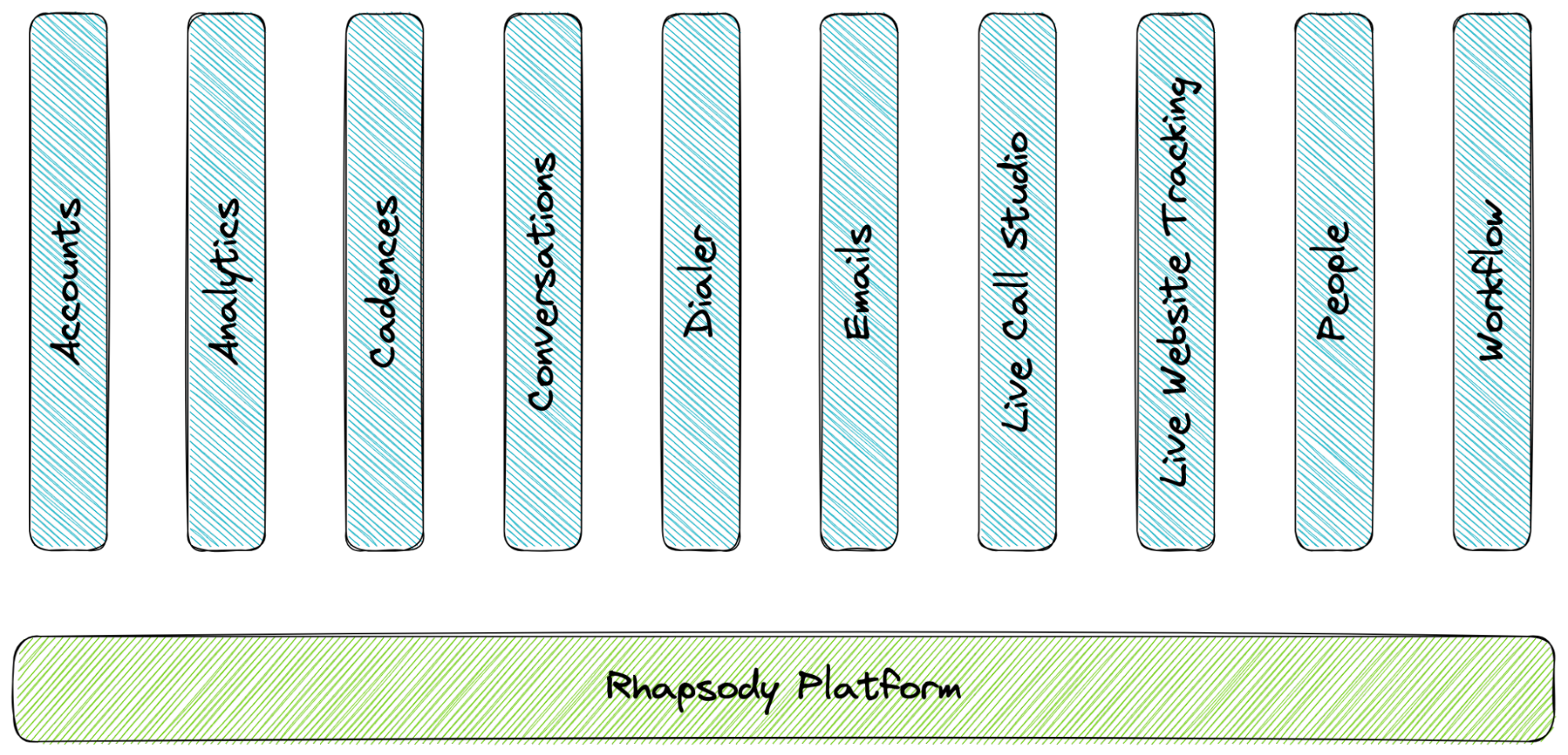
In this model, Rhapsody is divided into two separate yet equally important groups: "Rhapsody the platform" and "apps". Each app has an owning team (defined in code), has near-complete control over its dependencies, and can utilize the platform to display itself and get information regarding the current user and team. The platform is responsible for booting the application; displaying app code in the appropriate locations; managing events that flow through the system; and providing information to each app such as the currently authenticated user and their team, the current user’s permissions and enabled feature flags, and information required for localization.
Below is a more fine-grained look at the structure:
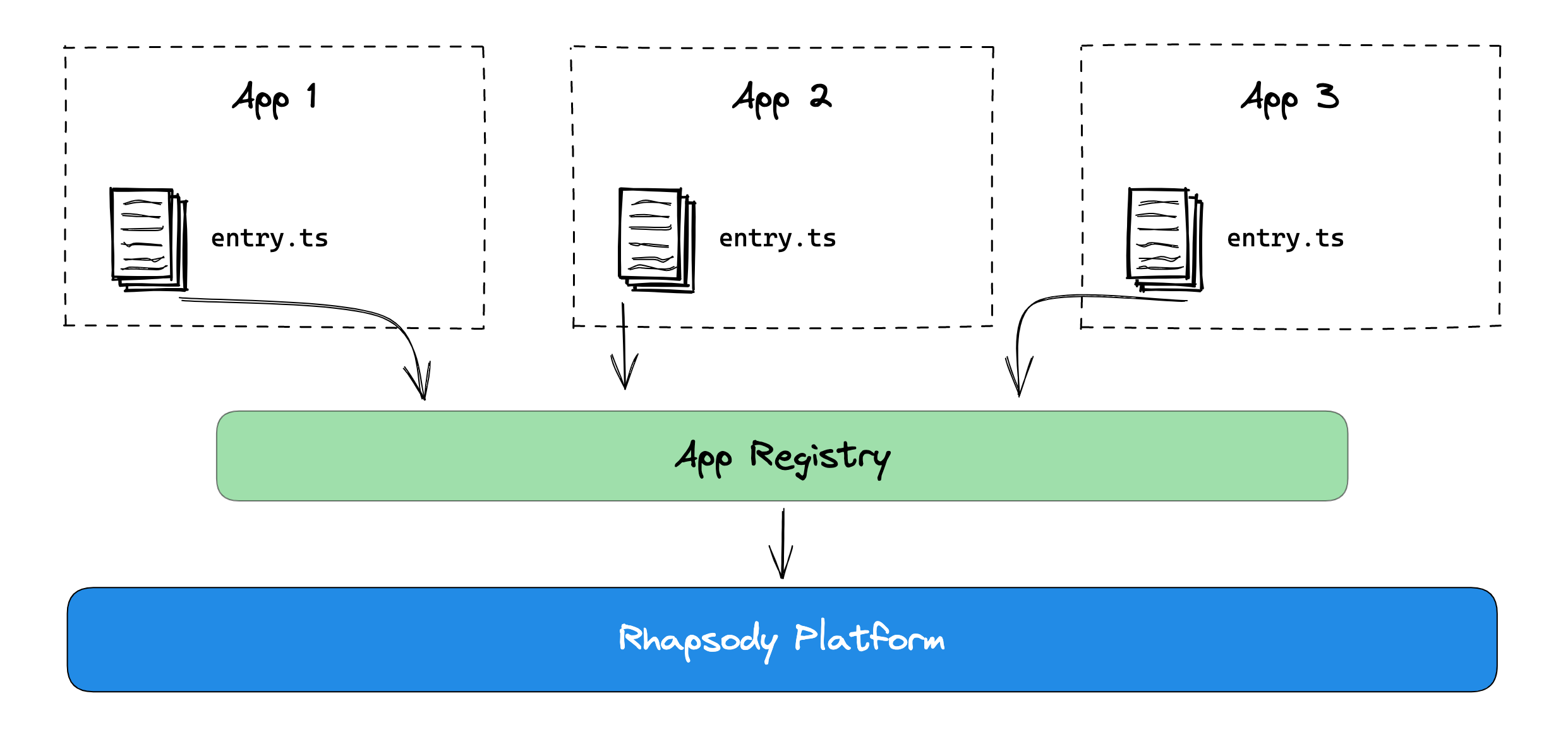
For the remainder of this document, the phrases "Rhapsody" and "the platform" are synonymous.
The Platform

Rhapsody becomes an integration target to be interfaced with as opposed to being one large monolithic application. Apps can inject code or UI components into the platform using the App Registry. They can also perform specific actions provided by the platform using platform packages, e.g. getting the currently authenticated user and team. In addition, the platform will be responsible for build tooling and testing infrastructure as well as certain heavily-used cross-cutting libraries, e.g. React and styled-components. Over time, the platform will also be able to make enhancements to how apps are packaged and delivered. For instance, we want to make sure the initial JS payload required to boot the application remains small and, as additional parts of the application are required by the user, we can lazily load them on demand.
Apps
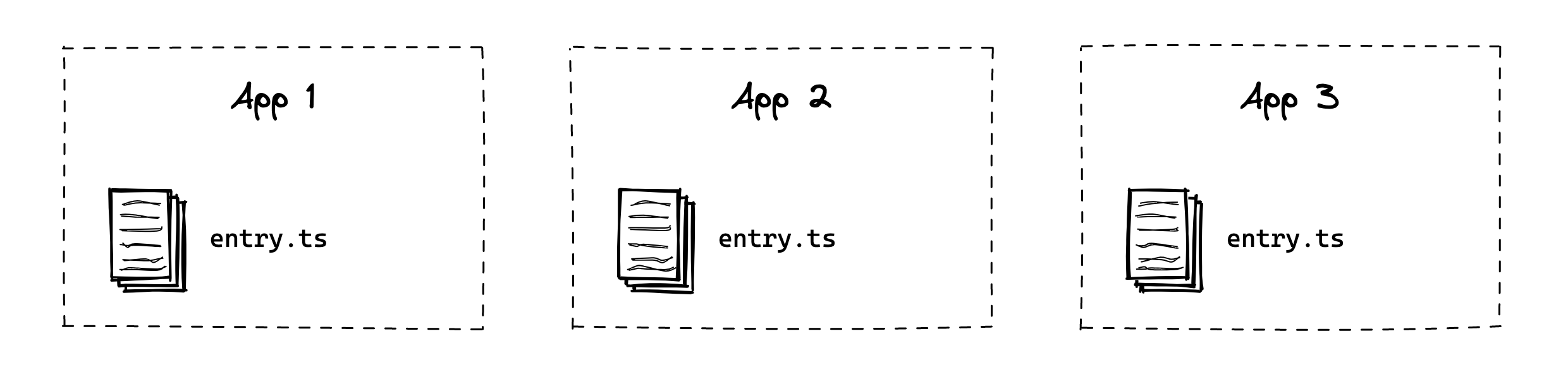
Apps are self-contained slices of Rhapsody, not too dissimilar to how they have operated historically. The primary distinction is they will be completely decoupled from both the platform and other apps except for a few explicit extension points. This decoupling prevents spaghetti code paradigms that introduce implicit dependencies and cloud how different parts of the application interact. As mentioned previously, the available extension points include using the App Registry to display UI components or execute code, and a pub/sub-style events service for sending messages to and receiving message from other apps.
Working In Rhapsody Today
Angular Deprecation
We are actively removing Angular from our codebase. Until that work is complete, Rhapsody will continue to be a mix of Angular and React code. New React code should move toward the vision and architecture articulated in this document, but we have no plans to shoehorn Angular in. We are gaining momentum in moving toward this Rhapsody vision, but it is still a work in progress. Please be patient as we navigate the bumps and intricacies of this migration. We highly encourage everyone working in Rhapsody to read through all Changelog discussions as that will be the best mechanism for staying up on the latest changes to Rhapsody.
Things to Know
Repo directory structure
rhapsody/
├── .github        # GitHub configuration and GH Actions workflows
├── apps           # Domain-specific product code
├── assets         # (Deprecated) Static assets included in the bundle
├── deploy         # Configuration required for QA deployment
├── docs-site      # Code to generate and build the Rhapsody docs site
├── infrastructure # Packages for building, serving, and testing
├── lang           # Generated l10n language files
├── platform       # Platform and internal packages
├── shared         # Shared packages
└── src            # (Legacy) Prior Angular + React code
Platform and shared repo packages
We have two sets of repo packages: platform (prefixed with @rhapsody/) and shared (prefixed with @shared/). These packages can be imported and used as one would any package installed via NPM. They just so happen to exist in the repository. Platform packages allow apps to interact with or request data from the platform (e.g. register code in the App Registry, check if the current user has a specific permission) and are always written in TypeScript. Shared packages can include any code that may need to be used across different apps but doesn't necessarily interact with the platform (e.g. common list view filters) and should be written in TypeScript as that is most helpful to all teams working in Rhapsody.
The Auth Context
The Auth Context is the primary mechanism by which apps can get information on the currently logged in user and team. Usage example and additional information can be found in the Auth Context README.
What is Devise?
If you are working in Angular or legacy React code, you may see Devise mentioned quite a bit. This was an old first-party Angular module that we created to house information about the currently authenticated user and team. This module has been deprecated. No new code should use it.
The VS Code extension
A VS Code extension is available for working with Rhapsody. It provides significant visibility into the available platform and shared packages, events registered with the events service and which files publish and subscribe to them, and a list of all apps and what each registers with the platform. We highly recommend utilizing the extension. Installation instructions can be found in the extension's repo.
How Rhapsody boots
- Rhapsody requests an auth token from Gandalf
- Rhapsody sets the region for the current user
- Rhapsody populates the Auth Context using the public API
- An XSRF cookie call is made to Melody
- Rhapsody requests an auth token from Melody
- Rhapsody requests the current user and team from the public API in parallel
- The Auth Context is populated with the results
- The navigation shell is rendered
- Post-boot tasks are initiated, e.g. enriching Bugsnag reports, initializing Segment
See the Session Management doc for more information on how user sessions are managed across the Salesloft platform.
TypeScript
We envision TypeScript being utilized more heavily as Rhapsody development continues. Historically, Rhapsody was only a JavaScript application. In 2020, we added TypeScript support. Now, all platform code is written in TypeScript. Additionally, all entry files (the files that register apps with the platform) must be TypeScript files. We strongly encourage using TypeScript when working in shared packages and teams are encouraged to use TypeScript in their application code as well.